Chrome’s enhanced autofill can now suggest details pulled straight from your Gmail while you fill out an online form, starting October 28, 2026. Google says it can surface order numbers, tracking information and flight bookings at the moment a form asks for them, and the rollout begins in the United States only.
The feature is powered by Gemini with Personal Intelligence, and it works on desktop, Android and iOS. It is aimed at Gemini in Chrome users who have Personal Intelligence turned on. Google has not said when Canadian users will get it.
What does enhanced autofill do now?
Regular autofill fills in what you have saved in Chrome, such as your name, address and card number. Google’s announcement, written by Chrome product manager Amanda Lim, says the new version goes further and handles information you never saved in the browser.
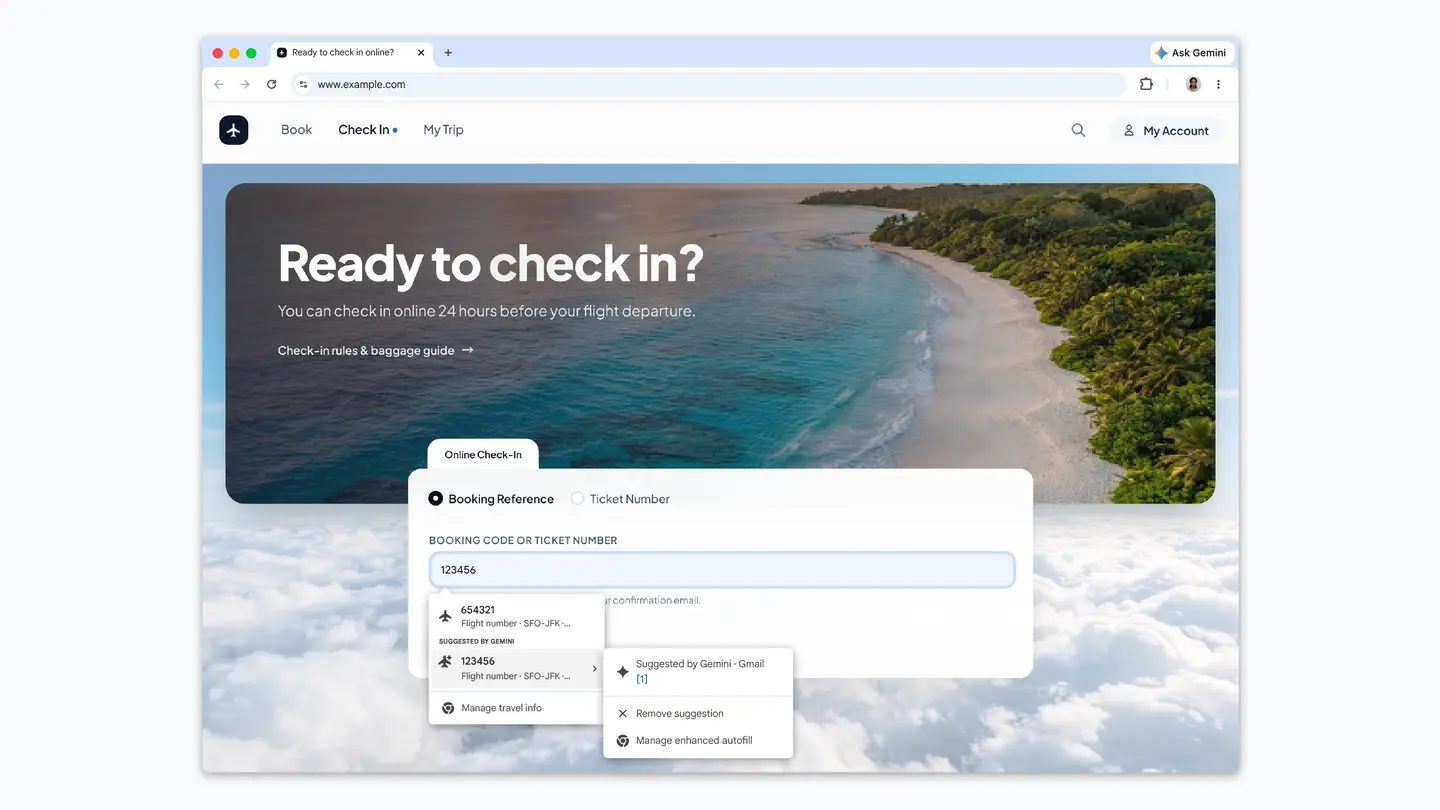
If a form asks for a booking reference or an order number, Chrome can look in Gmail and offer a suggestion in the field. Google’s example image shows an airline check-in page where a flight number appears in the suggestion list, labelled as suggested by Gemini from Gmail.
Google says it chose these details because they are the ones people usually hunt for by switching tabs or searching an inbox:
- Order numbers from store confirmation emails
- Tracking information from shipping notices
- Flight bookings from airline emails
What is coming next?
Google says it will soon extend enhanced autofill so it can securely read information from images stored in your Google Photos library. The announcement gives no date for that step and does not list which kinds of details it will read from photos.
Is it safe, and can you turn it off?
Google states that sensitive data is encrypted and that you remain in control. You can decide whether enhanced autofill is enabled, and what it is allowed to access, from your Chrome settings.
Earlier reports on the feature give more detail on how it works. Android Authority and PiunikaWeb both described a test version called “Find and fill with Gemini” in an early build of Chrome. According to those reports, the tool searched connected Google apps such as Gmail and Google Photos, could be triggered by typing @@ in a field, and had its own Enhanced autofill settings page where it could be switched off or given a different shortcut.
PiunikaWeb also relayed Chrome’s note that page titles and URLs may be sent to Google when the tool is used. Google says the information Gemini inserts into forms is not visible to people. Those points come from the test version, so check the live settings and privacy notices in your own copy of Chrome before relying on them.
Is it available in Canada?
Google says the capabilities are beginning to roll out in the U.S. The announcement does not name Canada or any other country. It also ties the feature to Gemini in Chrome users with Personal Intelligence enabled, so being on a supported browser is not enough on its own.
There is no price attached. The announcement does not say it is a paid feature, but it does not describe plans or tiers either, so Canadian and US readers should treat cost as unannounced rather than free.
Who it suits
Frequent online shoppers. If you often fill return, warranty or delivery forms that ask for an order number, the suggestion saves a trip to your inbox.
Travellers. Check-in and baggage forms that ask for a booking reference are the use Google chose to show. Having the code offered in the field cuts out copying it between tabs.
People who keep email tidy and trust Gemini with it. The feature depends on Personal Intelligence having access to your Gmail, so it only makes sense if you are comfortable with that link.
Who should wait. Anyone outside the United States, anyone who prefers that the browser never reads email, and anyone on a shared computer. The reports note that this is a larger step than ordinary autofill, which only uses details you have explicitly saved.
What is still unknown?
Google has not said when the rollout reaches Canada or other countries, how fast it will spread inside the United States, or which Gmail messages count as a match. It has also not given a date for Google Photos support.
For now, the simplest next step is to open Chrome settings, look for the enhanced autofill page, and check whether the switch is there and what it can access. If you are in Canada, watch Google’s Chrome announcements for a country update.