Gemini Notebook can now build an interactive website from the notes, research and sources you have already loaded into a notebook, and you start it by typing “make me a site” in the notebook chat. Google announced the feature on November 16, 2026, and says it is rolling out globally on the web today.
If you have ever stared at a pile of PDFs and wished they were one clickable overview, this is aimed at you. Instead of reading a summary, you get a small working page you can explore, open in its own tab and share. Google says the mobile app version is coming soon.
What can Gemini Notebook build for you?
Google gives three example uses, all described as work or study projects. You write the request in plain language next to your sources, and the notebook builds the site from them.
- Visual explainers for exams: an interactive periodic table or a historical timeline
- Interactive dashboards: a way to explore your data, such as quarterly sales performance
- Project management trackers: a page that outlines your tasks and deadlines
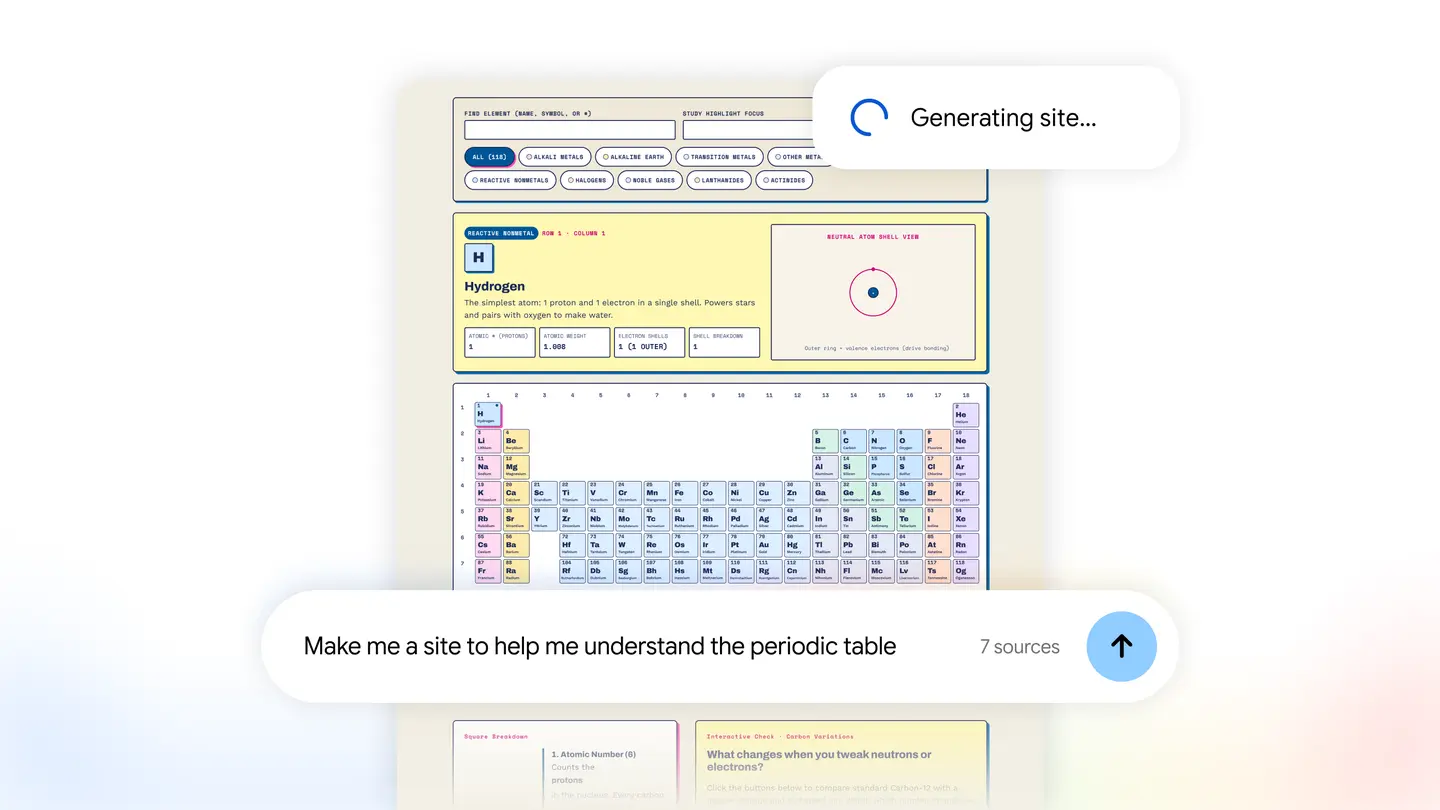
Google’s own preview image shows the idea. A prompt reading “Make me a site to help me understand the periodic table” sits under a loading message, and behind it a colour coded periodic table with a detail panel for one element, hydrogen.
The practical gain is that the output is grounded in what you gave the notebook rather than in a blank prompt. That matters for study material, where you want the page to reflect your own course notes and not a generic textbook.
How do you use it?
The steps are short, according to Google’s announcement:
- Open a notebook that already has your sources in it.
- In the chat, type “make me a site” and describe what you want to build.
- When the site is ready, select “Open in a new tab” to interact with it.
- Share it with others if you want them to see it too.
Google does not say how long a site takes to generate, how many sources a notebook can hold for this feature, or whether shared sites stay private to the people you choose. Check the notebook itself for sharing options before you send anything that contains personal or work data.
Who can use it, and what does it cost?
The feature is rolling out globally on the web for Gemini Notebook users aged 18 and over, including Google Workspace subscribers. Google’s post does not list a price or a plan requirement for the feature, so do not assume it is free or tied to a particular tier. The mobile app is described only as “coming soon”, with no date.
For context, Gemini Notebook is the new name for NotebookLM, which Google announced on July 16, 2026, according to 9to5Google. Google described it as a standalone research tool, and said at the time that it had more than 30 million users and over 600,000 organizations.
Who it suits
Students. A timeline or a periodic table built from your own class notes gives you something to click through before an exam, which is a different kind of revision from rereading.
Analysts and small business owners. If your numbers live in a spreadsheet or a report, an interactive dashboard such as quarterly sales performance can make them easier to explore and to show a colleague.
Project leads. A tracker built from a brief or a meeting summary can lay out tasks and deadlines in one page you share with the team.
Who should wait. If you need the feature on a phone, Google has only said mobile is coming soon. Anyone under 18 is outside the stated rollout, and workplaces with strict data rules should check how sharing works first.
What is still unknown
Google has not said how editable the generated sites are, whether you can export them, or how accurate the pages are when sources conflict. Treat the first few results as drafts and check the facts against your original material.
Where to start
Open a notebook with a handful of sources, type “make me a site” and ask for something small, such as a one page timeline. Google’s announcement on its Keyword blog is the place to watch for the mobile release.