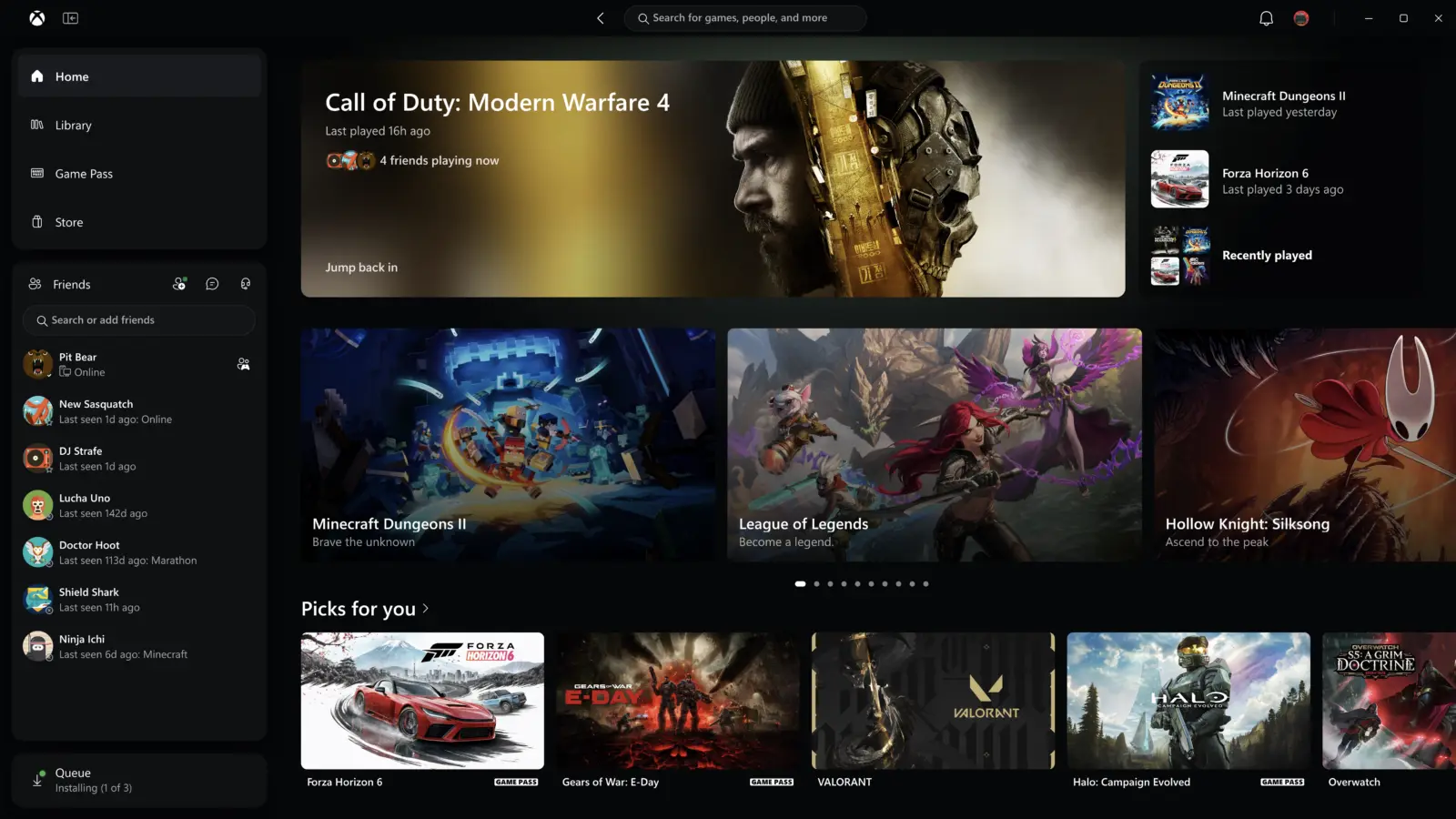
XBOX Insiders can try an updated XBOX PC app from today, and XBOX says it launches up to 60% faster than before. The company announced the change on XBOX Wire on November 5, 2026, together with a refreshed web experience for cloud gaming and updates to cloud apps on supported TVs and VR headsets.
The aim, in XBOX’s words, is to make the service faster, simpler and more familiar wherever you play. The PC app is the first piece to reach testers, while the web and TV changes are spreading to more players over the coming weeks.
How much faster is the new XBOX PC app?
XBOX claims the app launches up to 60% faster, with pages such as Home, Store and Game Pass loading up to 50% faster and in-app windows opening up to 65% faster. These numbers come from XBOX’s own testing, and the company notes that results vary by device, internet connection, system configuration and usage.
Windows Central, which tried an early build of the app in October, called it a lot faster than the previous version, using a library of more than 1400 XBOX titles. That was a hands-on impression, not a benchmark, and the build was still early.
What changes inside the PC app?
Beyond speed, XBOX lists five changes for Insiders:
- Library: simpler navigation, updated filters and new ways to organize your games.
- Friends: friends and social features move into the main navigation, so seeing what friends play, starting a chat or joining a party takes fewer steps.
- Search: one search covers more of XBOX, with results for games, including installed titles and add-ons, and for people.
- Look and feel: refreshed game cards, Home, Settings and animations.
- Speed: the load time gains described above.
Windows Central also noted that store and game listings now share one interface, and that the app makes it clearer whether a title is installable or only playable through cloud gaming.
What is new on the web and on TVs?
The refreshed XBOX web experience for cloud gaming, first previewed by Insiders earlier this year, will reach more players automatically over the next few weeks. If you want it sooner, you can open play.xbox.com.
It adds a Library tab that gathers every game you can play through cloud, whether you own it or reach it through XBOX Game Pass. You can browse, sort and filter by recently played, genre, input options and more. A desktop mode uses the space on PCs and larger displays better, and you can choose dark or light mode plus five new high-contrast options.
XBOX is also beginning to bring the refreshed look and navigation to its cloud gaming apps on supported TVs and VR headsets. The company did not list which TVs or headsets, so check your own device.
Prices and availability
No price change is attached to this update. Access to the new PC app is limited to members of the XBOX Insider Program for now, and XBOX has not given a date for a wider release. The web changes are rolling out to more players over the next few weeks. Game Pass and cloud gaming plans are priced separately, so check the XBOX site for your country.
Who it suits
PC players with big libraries. If you own hundreds of games and found the current app slow to open, this update targets you most directly, and the new filters and organizing options should help.
Cloud gamers. The Library tab and the high-contrast modes are the most practical gains if you play on a browser, a TV or a headset.
Players who want to join friends quickly. Moving social features into the main navigation saves a few clicks.
Who should wait. If you rely on the PC app every day and dislike early software, hold off on joining the Insider Program until the stable release, since Insider builds can change.
What is still unknown
XBOX has not said when the new PC app leaves the Insider stage, which TVs and VR headsets get the refreshed cloud apps first, or how the speed figures hold up on older hardware. Windows Central also reported that the early build did not yet have a lot of new functionality and that store pages were not fully built.
Next step
Insiders can join through the XBOX Insider Hub on Windows PC or XBOX consoles and send feedback at aka.ms/XBOXplayervoice. Everyone else can try the web version at play.xbox.com and read the original post on XBOX Wire.