Tobari Quiet, a Safari extension that shows web pages in muted dark colors, is free on the App Store until November 22, according to its listing. After that, the developer says it becomes a one-time purchase with no subscription. It is listed for iPhone and iPad.
The listing gives no year or time zone for the end date, and a limited-time offer can change at any time, so check the price on the App Store page before you tap Get.
What does the app do?
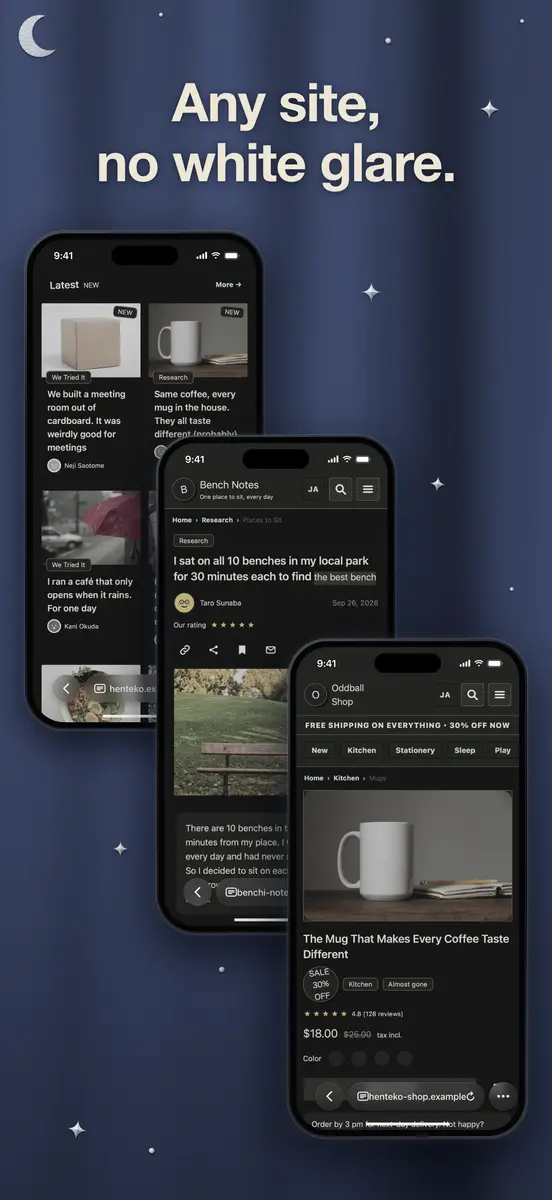
Tobari Quiet is built for people who read long pages in Safari at night or in dim rooms. According to the developer, it makes bright white pages and sites without their own dark mode easier on the eyes, while links, forms and menus keep working as usual.
- Colors: Dark gives pages muted dark colors. Match device follows the system appearance, Light uses soft light colors, and Don’t change leaves page colors alone, which is useful next to another dark mode extension.
- Quiet view: an extra layer that tones down images and text. Presets are Wind Down (black-and-white, faint images for bedtime), Low Key, Keep Private (hides images until you tap one) and Custom.
- Auto switch: turns Quiet view on from sunset to sunrise or during hours you set.
- Edge button: tap to switch Quiet view on or off for the current site, or pull it toward the center to change presets. It can sit on the left or right edge.
- Pure black: an option for iPhones with OLED displays, off by default.
The developer also says the extension sends no data anywhere, keeps settings on the device, and works alongside ad blockers.
How do I get it?
- Open the App Store page for Tobari Quiet: Dark Mode Safari on an iPhone or iPad and confirm the price shows as Free.
- Tap Get and install the app.
- Open the app and tap “Open Safari extension settings”.
- Switch the extension on in Settings, then allow it on the websites you want. If the button does not open Settings, the listing points to Settings > Apps > Safari > Extensions, or Settings > Safari > Extensions on some OS versions.
Who it suits
It suits readers who spend time in Safari after dark, people who find white pages harsh, and anyone who wants a quieter view of image-heavy sites. The Keep Private preset may also appeal to those who browse in public places.
Catches and unknowns
According to the listing, the extension works only on http:// and https:// pages you have allowed. It does not apply to special pages such as settings screens, or inside embedded frames. If it cannot finish starting within a few seconds, the page returns to its original look.
The listing shows a one-time purchase of JPY 500 in Japan and says nothing about other prices. The tech site New Mobile Life, which spotted the offer, gives the earlier price as US $0.99. The App Store page says it has not yet received enough ratings to show an overview, so there is little public feedback so far. The developer is listed as Tetsuo Kusumoto, and the app is rated 4+.
If you want it, install it before the offer ends. Read the full listing on the App Store before you decide.