Stampora, an iPhone and iPad app that puts realistic rubber stamps on PDF pages, is listed as Free on the App Store. The Hong Kong tip site New Mobile Life reported that the app normally costs US $0.99 and is free for a limited time. Neither the store listing nor the tip names an end date.
What does Stampora do?
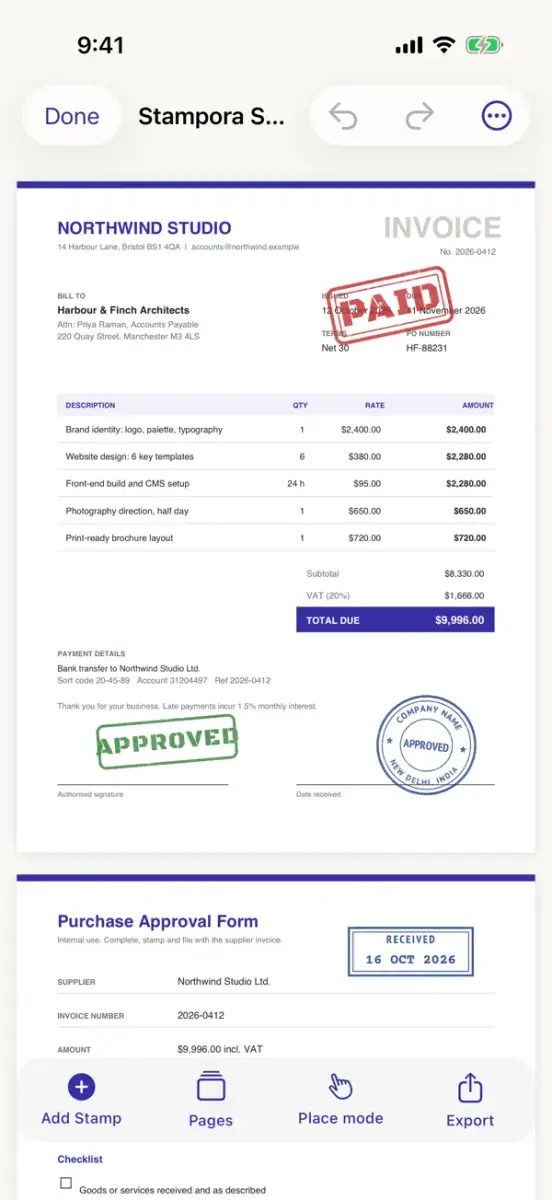
According to the listing, you design a stamp, drag it anywhere on a PDF and export a real stamped copy. Everything happens on the device: no account, no uploads and no tracking. You can place a stamp over text, images and margins on any page, then move, resize and rotate it with touch handles or type an exact position, size and angle. Snapping, guides and unlimited undo and redo are included.
The stamps are built to behave like rubber ones rather than stickers. You pick an ink preset such as Clean Office, Classic Rubber, Vintage, Heavy Ink, Faded, Hand-Pressed or Self-Inking, then adjust ink density, coverage, distressed edges, speckles, ink bleed and pressure. The listing says each impression is saved with the stamp, so it looks the same every time you open or export it.
Which templates and tools come with it?
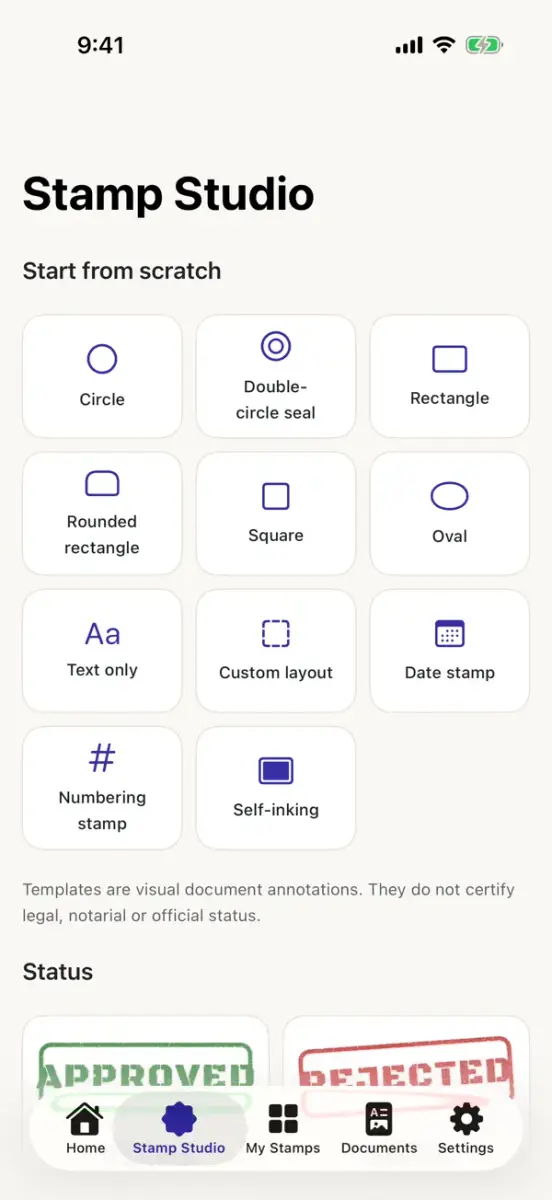
The app starts you off with 25 templates, including APPROVED, REJECTED, RECEIVED, PAID, PAYMENT PENDING, VERIFIED, CONFIDENTIAL, DRAFT, COPY, ORIGINAL, CANCELLED, REVIEWED, PROCESSED, URGENT, COMPLETED and FOR INTERNAL USE ONLY. There are also company seals, date and reference number stamps, and invoice, accounting and review stamps. Every template can be edited.
If you want your own design, you can make circles, double circle seals, rectangles, ovals and numbered stamps, with curved text around round seals, eight bundled fonts, icons, rings, borders, colours and opacity. You can also photograph a real stamp or your signature on paper, or pick an image, and the app removes the paper on the device to leave transparent artwork you can place like any other stamp.
For longer files, a stamp can be copied to every page, odd or even pages, a page range or pages you pick. Text or stamp watermarks can be repeated across the page, including behind the content.
Does it change the original PDF?
No, according to the developer. The listing says Stampora writes the stamps into the PDF itself, keeps the original text, images and page layout untouched and never flattens pages into pictures. Your original file is never modified, and you save the stamped copy to the device or share it from the Share sheet or Files. The app works fully offline. The privacy label says the developer does not collect any data, though Apple notes that this information has not been verified by Apple.
One limit matters if you work with contracts or invoices: the listing states that Stampora stamps are visual annotations and on their own do not provide legal, notarial or official certification.
Prices
| Item | Price shown |
|---|---|
| Download on the App Store listing | Free |
| Usual price, according to New Mobile Life | US $0.99 |
| In-app purchases | None listed on the page |
These are prices at the time of writing, in US dollars as the sources give them, and other App Store regions may differ. Because no end date is stated, the offer could end at any time.
How do I get it?
- Open the App Store on an iPhone or iPad and find Stampora - Stamp & Sign PDFs by Sanaur Rahman.
- Check that the button reads Get and not a price.
- Tap Get and confirm with your Apple Account.
The app needs iOS 17.0 or later, is listed at 16.3 MB and comes in English only. The listing does not yet show enough ratings or reviews to display an overview, so it is a new and untested name.
Who it suits
Stampora suits office staff, freelancers and small teams who regularly mark PDFs with words such as APPROVED, PAID or CONFIDENTIAL and want to do it from a phone without sending files to a server. It is less suited to anyone who needs a certified digital signature, since the developer says the stamps carry no legal weight on their own. If you only stamp a document once in a while, the free price removes the main reason to hold back.
Next step: open the official App Store listing and check that the price button reads Get before you download.