If your router’s device list shows names like “tablet-7f3a” and “ESP_3C21B0” and you cannot tell whose they are, HostLens is an iPhone Wi-Fi scanner that is listed as Free on the App Store right now. New Mobile Life, which spotted the offer, says it normally costs US $0.99 and is free for a limited time. No end date is given.
HostLens is made by EunWoo Song and sits in the Utilities category. It scans your home Wi-Fi, lists the connected devices by name and type when it can tell, and runs a check-up that shows whether a slowdown looks like your Wi-Fi or your internet line. The download is listed at 10.6 MB.
What exactly is free?
The whole app. The App Store page shows the price as Free, and the developer says there are no ads, no subscription and no account. The listing shows no in-app purchases. The US $0.99 regular price comes from New Mobile Life, not from Apple’s page.
The listing is for iPhone only. The Free price shown here is from the US App Store listing, and the sources do not say whether other country stores show the same price. It is available in English plus 13 more languages.
What does it do?
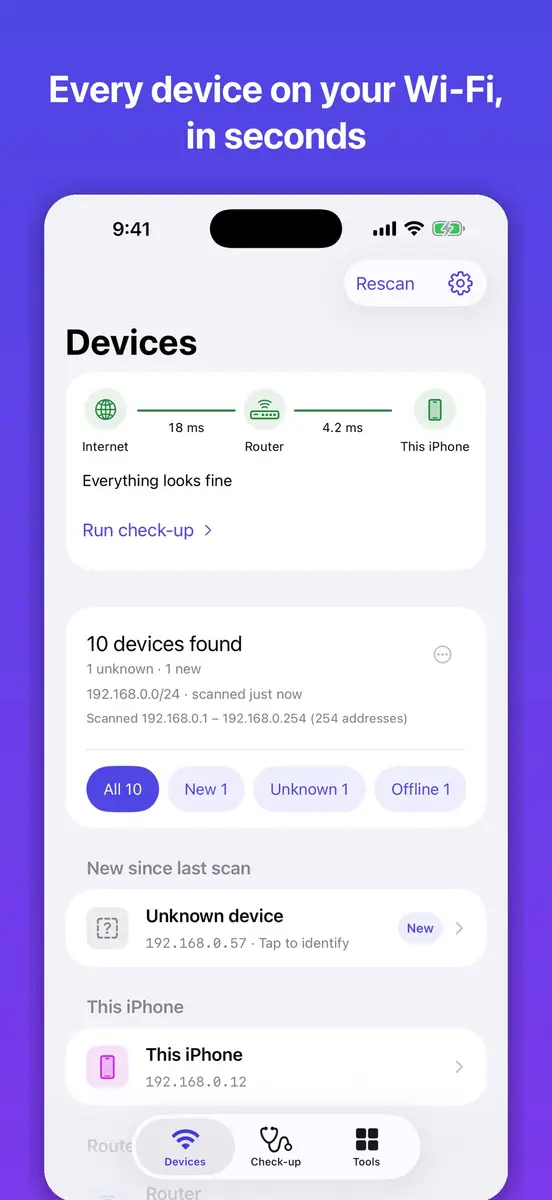
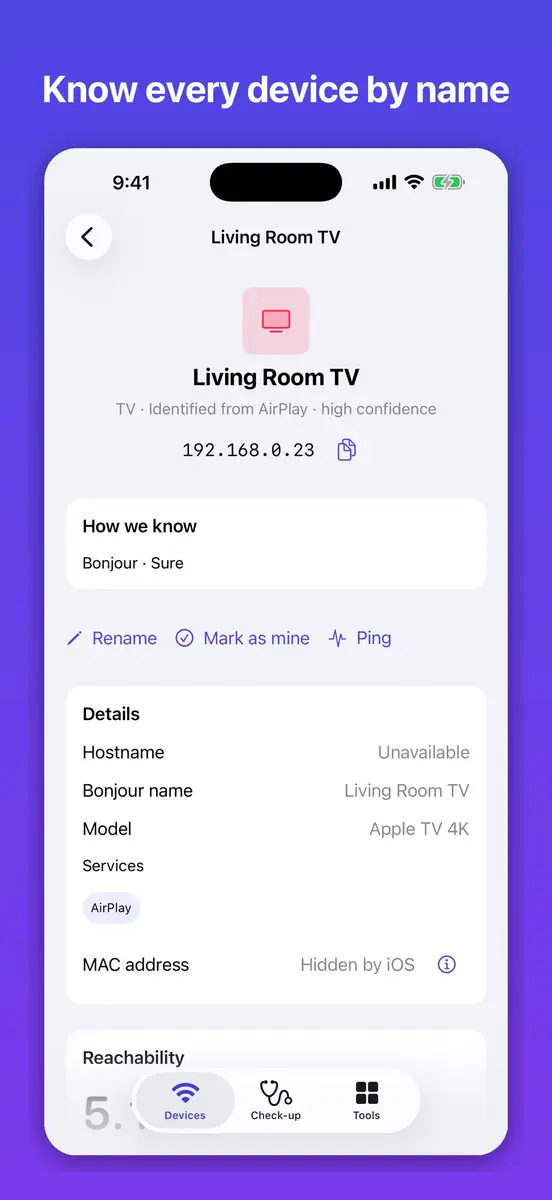
Open the app and it checks your connection and scans your Wi-Fi. Connected devices appear in a list, with new ones at the top. Phones, computers, TVs, printers, speakers and smart plugs are all covered. The developer’s examples of names are “Apple TV 4K”, “HP LaserJet” and “iPad”. A device it cannot name stays as “Unknown device”, so you know which ones to check.
- A “New since last scan” list shows what joined since you last looked.
- Each device shows whether it is online or offline and when HostLens last saw it.
- You can get an alert when a new device joins your network.
- Tap a device to see its IP address, hostname, Bonjour name, maker and model when HostLens can find them, plus open ports.
- You can ping a device, open its own web page, give it a name and an icon, mark it as yours or remove it from the list.
How does it check a slow connection?
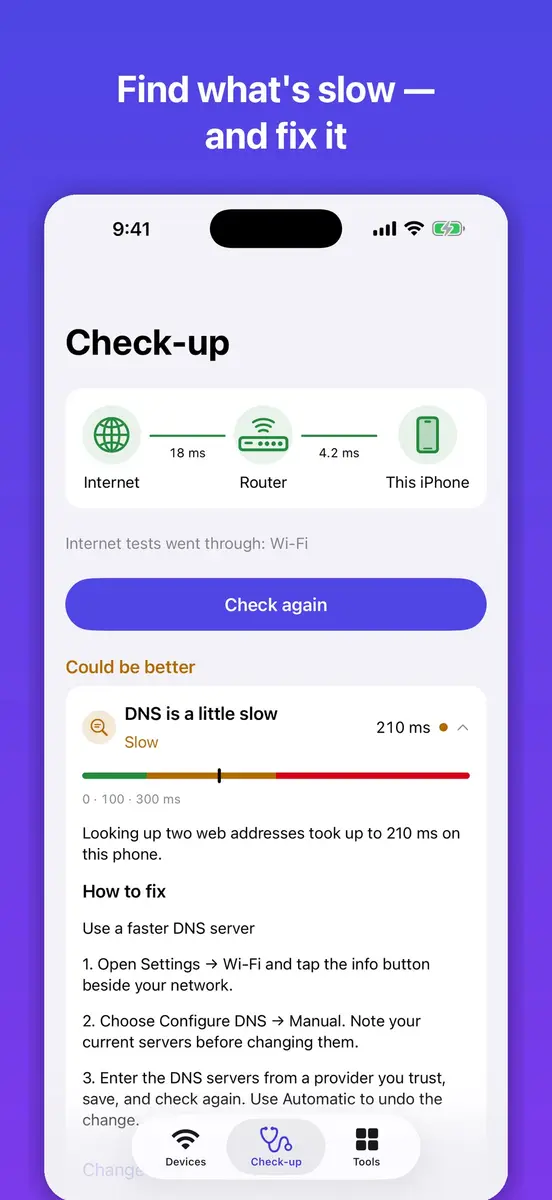
The check-up measures response times to your router and to the internet, plus DNS, and shows which part looks slow: your Wi-Fi and router, or your internet line. It also checks how quickly popular sites respond. Each result is explained in plain words, and each problem comes with steps to try.
For bigger networks, deep scan and custom address ranges are included. Extra tools include a ping with a live chart, DNS lookup, a port check and a subnet calculator, plus a scan history you can export as CSV or text.
What can it not do?
The developer is direct about the limits. HostLens cannot disconnect a device. If you find one you do not know, it opens your router’s settings page, where your router lets you see what is connected. iOS also hides other devices’ hardware addresses (MAC), and HostLens says so instead of guessing. The developer adds that you should use HostLens only on networks you own or are allowed to check.
What is the catch?
The offer is time limited according to New Mobile Life, but no end date is stated. The app is brand new on the store: the page says it has not received enough ratings or reviews to display an overview, and the version history shows small fixes and added languages in versions 1.0.2 and 1.0.3.
On privacy, the developer says scan results stay on your iPhone. The App Privacy section, which Apple says it has not verified, lists analytics, diagnostics, identifiers and user content as data that may be collected but is not linked to your identity.
Prices
HostLens is listed as Free on the US App Store at the time of writing. New Mobile Life reports the regular price as US $0.99. The listing and the tip give no end date for the free offer, so the price can change at any time. The sources give no prices for other countries or currencies.
Who it suits
Households with a slow network. If streaming stalls at night, the check-up points you toward your Wi-Fi and router or your internet line, with steps to try for each.
Anyone with a crowded smart home. Lists of plugs, speakers and TVs get long. Naming and marking devices as yours makes the odd one stand out.
Curious users and small offices. Ping, DNS lookup, port checks and CSV export go beyond a plain list, and deep scan covers larger networks.
Who should skip it. If you want an app that blocks or removes an unknown device, HostLens does not do that, and you will still need your router’s settings.
How to get it
Open the App Store on your iPhone, search for HostLens: WiFi Device Scanner by EunWoo Song, and check that the button says Get before you download. If it shows a price, the offer has ended or does not apply in your country. Use the app only on networks you own or are allowed to check, and download only from the official App Store listing.